


Process Automation
By Grant Crawley · 23 January 2023

Process Automation
What is Process Automation?
Process automation is a rapidly growing field that is transforming how businesses operate. Use it to automate routine tasks and processes, allowing them to be completed more quickly, efficiently and cost-effectively. Process automation can streamline and improve a variety of business processes, including customer service, billing, inventory management, finance administration, marketing operations and employee onboarding.
Solutions range from basic automation tools to more advanced robotic process automation (RPA), digital process automation (DPA) and intelligent process automation (IPA). Increasingly, businesses also use workflow orchestration platforms such as n8n to connect software-as-a-service (SaaS) applications, application programming interfaces (APIs), databases, webhooks and Artificial Intelligence (AI) services into practical, multi-step workflows.
This post explores each type of process automation, how it delivers business value, where n8n fits, and the steps you should take to implement automation successfully.
Robotic Process Automation (RPA)
Robotic Process Automation (RPA) is the application of technology to automate routine tasks and processes that are typically time-consuming and manual. RPA can be used to automate mundane and repetitive tasks such as data entry, data extraction and document processing. By automating these tasks, organisations can reduce the time they spend on manual processes and focus on more valuable activities.
RPA typically works well where teams rely on desktop applications, legacy systems or browser-based tools that do not offer reliable API access.
RPA can also reduce costs by removing unnecessary manual labour and improving accuracy by reducing human error. It can improve customer experience by helping organisations provide faster and more consistent services.
Benefits of RPA
RPA offers several benefits for businesses, including:
- Improved accuracy – RPA bots are programmed to follow specific rules, so they are less prone to errors than manual processing.
- Increased efficiency – RPA bots can complete tasks faster than humans, reducing labour costs and improving productivity.
- Reduced costs – By automating manual processes, businesses can reduce the cost of repetitive administration.
- Improved customer service – RPA bots can help handle customer enquiries, updates and routing more quickly and accurately.
Tools for Implementing RPA
You should consider using the following tools for implementing RPA:
- Power Automate Desktop – A simple RPA tool that records and plays back application tasks in Microsoft Windows.
- Automation Anywhere – A popular RPA tool that helps businesses automate mundane manual tasks.
- UiPath – Another popular RPA tool that helps organisations automate business processes.
- Blue Prism – A powerful RPA tool that enables organisations to automate complex tasks.
Digital Process Automation (DPA)
Digital Process Automation (DPA) enables organisations to automate digital tasks and workflows. Unlike RPA, which often focuses on repetitive screen-based activity, DPA is designed to automate processes that involve multiple systems, approvals, data sources and business rules.
DPA usually uses API calls, webhooks and native connectors to integrate with other systems such as Customer Relationship Management (CRM), Enterprise Resource Planning (ERP), finance, marketing, support and document management platforms. It can be used to automate tasks such as social media management, invoice processing, customer onboarding, lead routing, document approvals and internal notifications.
DPA typically takes place in the cloud, but some systems can interface with RPA to combine cloud-based SaaS products with desktop software or legacy applications.
The advantages of DPA are similar to those of RPA, including cost savings, increased efficiency and improved accuracy. DPA can also make it easier to adopt new technologies, including AI and machine learning, because it provides the integration layer that connects data, systems and actions.
Where n8n Fits in Process Automation
n8n is a workflow automation and orchestration platform. It is especially useful when a business needs to connect multiple systems, trigger workflows from events, transform data between applications, or add AI into an operational process.
In practical terms, n8n can be used to:
- connect SaaS platforms, internal systems, APIs and databases;
- receive and send data through webhooks;
- orchestrate multi-step workflows across departments;
- add conditional logic, approvals and human-in-the-loop checkpoints;
- connect AI services to business systems;
- prototype automations quickly before investing in heavier custom software;
- self-host automations where greater control over data, infrastructure or deployment is required.
For example, a customer support workflow could use n8n to receive a new enquiry, enrich the customer record from a CRM, classify the message using AI, create a ticket, notify the right team in Microsoft Teams or Slack, and draft a suggested response for a human to review.
At virtco®, n8n is part of our automation and integration toolkit alongside Power Automate, APIs, webhooks and custom workflow engines. Our internal capability material specifically identifies n8n for automation and orchestration, including multi-step workflows, API integration and Docker-based deployment options. It also identifies n8n as a practical tool for agentic AI workflows that integrate with hundreds of apps.
Benefits of DPA
Digital Process Automation can result in multiple benefits for your business, including:
- Increased efficiency – DPA automates manual tasks, reducing the time and effort required to complete work.
- Improved customer experience – DPA can help organisations respond automatically to customer requests, updates and feedback.
- Reduced costs – DPA reduces the cost of manual processes and the time spent on repetitive tasks.
- Increased accuracy – DPA helps to reduce manual errors because data is processed in a consistent and reliable way.
- Improved agility – Automation can help organisations respond quickly to changes in the market, customer demand or internal operating requirements.
- Better integration – Platforms such as n8n can connect cloud apps, APIs and internal systems that would otherwise remain isolated.
Tools for Implementing DPA
You should consider the following tools when implementing Digital Process Automation:
- Microsoft Power Automate is an automation tool that enables users to create automated workflows with little or no coding. It allows users to automate tasks and processes within Microsoft 365 and many external API-connected SaaS apps.
- n8n is a workflow automation and orchestration platform that can connect applications, APIs, databases and AI services. It is useful for teams that need flexible, multi-step workflows, custom logic, webhooks and deployment options beyond simple app-to-app automation.
- Zapier is an automation tool that connects different apps and automates workflows. It allows users to create customised tasks and processes with no coding needed.
- IFTTT (If This Then That) is an automation tool that connects different apps and services. It allows users to create custom tasks and processes to save time and make work more efficient.
- Make is an automation tool that enables users to connect apps and automate tasks without coding. It allows users to create their own automated workflows to save time and make work more efficient.
Intelligent Process Automation (IPA)
Intelligent Process Automation (IPA) combines the capabilities of RPA and DPA with Artificial Intelligence (AI) and Machine Learning (ML) technologies to automate more complex cognitive tasks.
Intelligent bots and workflows can be designed to understand natural language, identify patterns in data, generate insights and support decision-making. IPA helps to reduce manual workloads, improve accuracy and increase efficiency.
IPA typically takes place in the cloud and uses AI or ML to make recommendations about the next action to take. Some systems can interface with both RPA and DPA to automate cloud-based SaaS products, desktop software and human approval workflows.
n8n and Agentic AI Workflows
As AI adoption grows, n8n can play an important role in IPA because it can orchestrate the actions around an AI model. The AI may classify a message, summarise a document, extract structured data, suggest a decision or draft a response, but the workflow platform determines what happens next.
This is particularly useful for agentic AI workflows, where an AI-enabled process takes context-driven actions across multiple systems while still keeping appropriate controls in place. In a well-designed IPA workflow, n8n can:
- pass data to a Large Language Model (LLM);
- retrieve relevant information from business systems;
- apply business rules before an action is taken;
- route exceptions to a human reviewer;
- create tasks, tickets, records or notifications;
- log actions for auditability and improvement.
The important point is that AI should not be treated as a standalone tool. It becomes more valuable when it is connected to real business processes, reliable data and clear governance.
Benefits of IPA
IPA offers several benefits for businesses, including:
- Improved accuracy – IPA workflows can apply rules, models and validation checks consistently.
- Improved efficiency – IPA can process data quickly and accurately, reducing labour costs and improving productivity.
- Improved decision-making – IPA can identify patterns in data, generate insights and support better-informed decisions.
- Better knowledge reuse – AI can summarise, classify and retrieve information from internal knowledge sources.
- More scalable service delivery – Teams can handle larger volumes of work without simply adding more administration.
Tools for Implementing IPA
Businesses should consider using the following tools for implementing IPA:
- Microsoft AI Builder – A Microsoft Power Platform capability that helps organisations add AI into workflows and business applications.
- n8n – A practical orchestration layer for connecting AI services, APIs, data sources and operational systems into controlled, multi-step workflows.
- Google Cloud AI – A set of AI tools and services that enable organisations to process data and build AI-powered applications.
- IBM Watson – A set of AI and automation technologies that can support complex AI-enabled business processes.
Process Automation Working Together
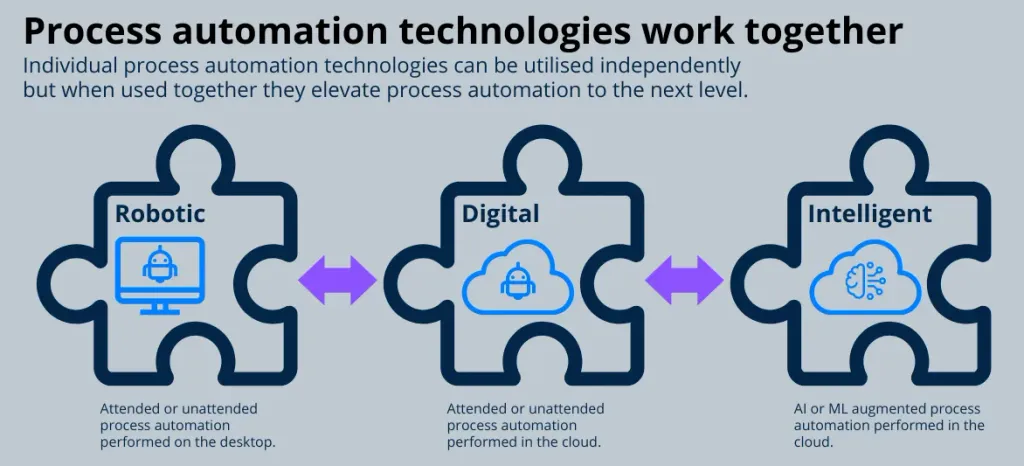
You can use process automation technologies independently, but to get the most value it is better to use them in a unified way.
A mature automation environment may use:
- RPA to interact with desktop or legacy systems that have no API.
- DPA to connect cloud platforms, SaaS tools, APIs and databases.
- n8n or similar orchestration tools to coordinate multi-step workflows, webhooks, approvals and AI actions.
- IPA to add intelligent classification, summarisation, extraction, recommendations and decision support.
By integrating these technologies you can automate complex processes that would be too time-consuming or expensive to complete manually. This integrated approach can reduce errors, improve consistency, increase productivity, reduce costs and improve customer service.
Choosing Between Power Automate, n8n, Zapier and RPA
The right tool depends on the business process, the systems involved, the level of technical control required and the governance needs of the organisation.
| Requirement | Good fit |
|---|---|
| Automating Microsoft 365 approvals, Teams notifications or SharePoint processes | Microsoft Power Automate |
| Connecting many SaaS tools with simple triggers and actions | Zapier or Make |
| Building flexible, multi-step workflows with APIs, webhooks, custom logic and AI orchestration | n8n |
| Automating desktop applications or legacy systems without API access | RPA tools such as Power Automate Desktop, UiPath, Automation Anywhere or Blue Prism |
| Combining AI, data retrieval, business rules and human review | n8n, Power Automate, custom workflows or IPA platforms |
For many small and mid-sized organisations, the best approach is not to choose a single platform too early. Start with the outcome you need, map the process, understand the data, then choose the simplest tool that can deliver the result reliably and securely.
Steps for Implementing Process Automation
Organisations should consider the following steps when implementing process automation:
- Assess your current processes – First assess the current processes and identify where automation can be applied. This helps determine the scope of the implementation and the best automation tools for the job.
- Identify the business outcome – Define the measurable result you want, such as reducing invoice processing time, improving response speed, reducing rework or increasing customer satisfaction.
- Design the process – Map the process from start to finish, including the tasks to be automated, the data to be captured and the systems that need to interact.
- Choose the right technology – Select the technology that best fits the workflow. For example, RPA may suit a legacy desktop process, Power Automate may suit a Microsoft 365 process, and n8n may suit a multi-system API or AI orchestration workflow.
- Integrate the technology – Configure the automation and connect it to existing systems, data sources and approval points.
- Design for security and governance – Consider access control, audit logs, data protection, error handling, human approval points and ownership before the workflow goes live.
- Train and deploy – For IPA and AI-enabled workflows, train users as well as models. Staff need to understand how the automation works, when to trust it and when to intervene.
- Test and monitor – Test the workflow with real scenarios before full deployment. Monitor usage, exceptions, errors and business outcomes so the automation can be improved over time.
Time Savings Using Process Automation
The amount of time saved by automating different tasks can vary depending on the specifics of the task and the automation solution used. In general, tasks that are highly repetitive, rule-based and do not require complex human judgement are the most efficient to automate.
Here is a list of tasks typically performed by small and mid-sized businesses that are ideally suited to automation, ordered by the amount of time that can often be saved:
- Data entry and processing: Automating repetitive data entry and processing tasks such as invoice processing, data validation and record-keeping can save a significant amount of time, as these tasks are often tedious and prone to errors.
- Workflow management: Automating end-to-end business processes such as purchase order approvals, HR onboarding and expense management can save time by streamlining the process.
- Customer service: Automating repetitive customer service tasks such as responding to frequently asked questions, classifying enquiries and routing complaints to the correct department can save time and improve customer experience.
- Financial tasks: Automating financial tasks such as invoice processing, payment reconciliation and financial forecasting can reduce the need for manual data entry and processing.
- Marketing tasks: Automating campaign management, social media scheduling, lead capture and follow-up can reduce repetitive administration.
- Supply chain management: Automating supply chain processes such as inventory management, purchase orders and logistics updates can reduce the need for manual tracking and coordination.
- Human resources tasks: Automating HR tasks such as employee onboarding, benefits administration and performance review reminders can reduce manual coordination.
- AI-assisted knowledge work: Using AI-enabled workflows to summarise documents, classify emails, extract information or draft first responses can reduce the administrative burden on specialist teams while keeping humans in control.
It is important to note that the time saved by automating a task will depend on the specific nature of the work, the complexity of the automation solution and the skills and resources of your team. Automation is not a one-time project. It is an ongoing process of improvement, monitoring and optimisation.
Common n8n Use Cases for SMEs
For small and mid-sized enterprises (SMEs), n8n is particularly useful where a process crosses several applications and needs more flexibility than a simple trigger-action automation.
Common use cases include:
- Lead capture and qualification – Capture enquiries from forms, enrich records, score leads, update the CRM and notify sales.
- Customer onboarding – Create folders, tasks, contracts, welcome emails and internal notifications from one approved trigger.
- Invoice and finance workflows – Route supplier invoices, extract key data, request approvals and update finance systems.
- Support triage – Classify support requests, detect urgency, assign tickets and draft responses for review.
- Marketing operations – Repurpose content, schedule campaigns, sync lists and notify teams when prospects engage.
- Compliance and audit workflows – Collect evidence, log actions, flag missing information and route exceptions to responsible owners.
- AI-enhanced administration – Summarise long emails, extract structured data from documents and create follow-up tasks automatically.
The best n8n projects usually start with a narrow, high-value workflow rather than an attempt to automate everything at once.
Conclusion
Process automation tools are rapidly becoming essential for organisations looking to remain competitive in the modern digital workplace. These technologies offer a wide range of business benefits, including improved efficiency, reduced costs, increased accuracy and better customer experience.
RPA is useful when you need to automate desktop or legacy systems. DPA is valuable when you need to connect digital systems and streamline workflows. IPA adds intelligence through AI and machine learning. n8n fits strongly in the middle as a flexible orchestration platform that can connect apps, APIs, webhooks, data sources and AI services into practical business workflows.
To use these technologies effectively, organisations should identify processes suitable for automation, assess the potential business impact, create a roadmap, design the workflow, choose the right platform and monitor the results after deployment. The goal is not automation for its own sake. The goal is measurable operational improvement.
To help businesses accelerate their path to a digital workplace, we have designed our Intelligent Solution Designer to take businesses from zero or experimental stages of process automation deployment to a production-level system in a matter of weeks. Use the link below to start the conversation.